Role-based Access Control (RBAC)
QuestDB Enterprise provides fine-grained access control that can restrict access at database, table, column, and even row level (using views).
Role-based Access Control (RBAC) is available in QuestDB Enterprise.
Quick start
Here's a complete example to create a read-only analyst user in under a minute:
-- 1. Create the user
CREATE USER analyst WITH PASSWORD 'secure_password_here';

-- 2. Grant endpoint access (required to connect)
GRANT PGWIRE, HTTP TO analyst;

-- 3. Grant read access to specific tables
GRANT SELECT ON trades, prices TO analyst;

-- Done! The analyst can now connect and query trades and prices tables
To verify:
SHOW PERMISSIONS analyst;
Access control depth
QuestDB's access control operates across two dimensions:
Data access granularity
Control what data users can access:
| Level | What you can control | Example |
|---|---|---|
| Database | All tables, global operations | GRANT SELECT ON ALL TABLES TO user |
| Table | Specific tables | GRANT SELECT ON trades TO user |
| Column | Specific columns within a table | GRANT SELECT ON trades(ts, price) TO user |
| Row | Specific rows via views | Create a view with WHERE clause, grant access to view |
Connection access granularity
Control how users can connect:
| Permission | Protocol | Use case |
|---|---|---|
HTTP | REST API, Web Console, ILP/HTTP | Interactive users, web applications |
PGWIRE | PostgreSQL Wire Protocol | SQL clients, BI tools, programmatic access |
ILP | InfluxDB Line Protocol (TCP) | High-throughput data ingestion |
-- User can connect via PostgreSQL protocol only (not web console)
GRANT PGWIRE TO analyst;

-- Service can only ingest via ILP, cannot query
GRANT ILP TO ingest_service;

-- Full interactive access
GRANT HTTP, PGWIRE TO developer;
These dimensions are independent: a user might have SELECT on all tables but
only be allowed to connect via PGWIRE, or have INSERT permission but only
via ILP.
Column-level access
Restrict users to see only certain columns:
-- User can only see timestamp and price, not quantity or trader_id
GRANT SELECT ON trades(ts, price) TO analyst;
Row-level access with views
For row-level security, create a view that filters rows, then grant access to the view instead of the underlying table:
-- Create a view that only shows AAPL trades
CREATE VIEW aapl_trades AS (
  SELECT * FROM trades WHERE symbol = 'AAPL'
);

-- Grant access to the view, not the base table
GRANT SELECT ON aapl_trades TO aapl_analyst;
-- No GRANT on trades table = user cannot see other symbols
The user aapl_analyst can only see AAPL trades. They have no access to the
underlying trades table.
Common scenarios
Read-only analyst
A user who can query data but cannot modify anything:
CREATE USER analyst WITH PASSWORD 'pwd';
GRANT HTTP, PGWIRE TO analyst;
GRANT SELECT ON ALL TABLES TO analyst;
Application service account
A service account for an application that ingests data into specific tables:
CREATE SERVICE ACCOUNT ingest_app WITH PASSWORD 'pwd';
GRANT ILP TO ingest_app;                    -- InfluxDB Line Protocol access
GRANT INSERT ON sensor_data TO ingest_app;  -- Can only insert into sensor_data
Team-based access with groups
Multiple users sharing the same permissions:
-- Create a group
CREATE GROUP trading_team;

-- Grant permissions to the group
GRANT HTTP, PGWIRE TO trading_team;
GRANT SELECT ON trades, positions TO trading_team;
GRANT INSERT ON trades TO trading_team;

-- Add users to the group - they inherit all permissions
CREATE USER alice WITH PASSWORD 'pwd1';
CREATE USER bob WITH PASSWORD 'pwd2';
ADD USER alice TO trading_team;
ADD USER bob TO trading_team;
Column-level restrictions (hide sensitive data)
Allow access to a table but hide sensitive columns:
CREATE USER auditor WITH PASSWORD 'pwd';
GRANT HTTP, PGWIRE TO auditor;

-- Grant access to non-sensitive columns only
GRANT SELECT ON employees(id, name, department, hire_date) TO auditor;
-- Columns salary and ssn are not granted = invisible to auditor
Row-level security (multi-tenant)
Different users see different subsets of data:
-- Base table has data for all regions
CREATE TABLE sales (ts TIMESTAMP, region SYMBOL, amount DOUBLE) TIMESTAMP(ts);

-- Create region-specific views
CREATE VIEW sales_emea AS (SELECT * FROM sales WHERE region = 'EMEA');
CREATE VIEW sales_apac AS (SELECT * FROM sales WHERE region = 'APAC');

-- Grant users access to their region only
CREATE USER emea_manager WITH PASSWORD 'pwd';
GRANT HTTP, PGWIRE TO emea_manager;
GRANT SELECT ON sales_emea TO emea_manager;

CREATE USER apac_manager WITH PASSWORD 'pwd';
GRANT HTTP, PGWIRE TO apac_manager;
GRANT SELECT ON sales_apac TO apac_manager;
Database administrator
A user with full control (but not the built-in admin):
CREATE USER dba WITH PASSWORD 'pwd';
GRANT DATABASE ADMIN TO dba;
DATABASE ADMIN grants all current and future permissions. Use sparingly.
Core concepts
Users and service accounts
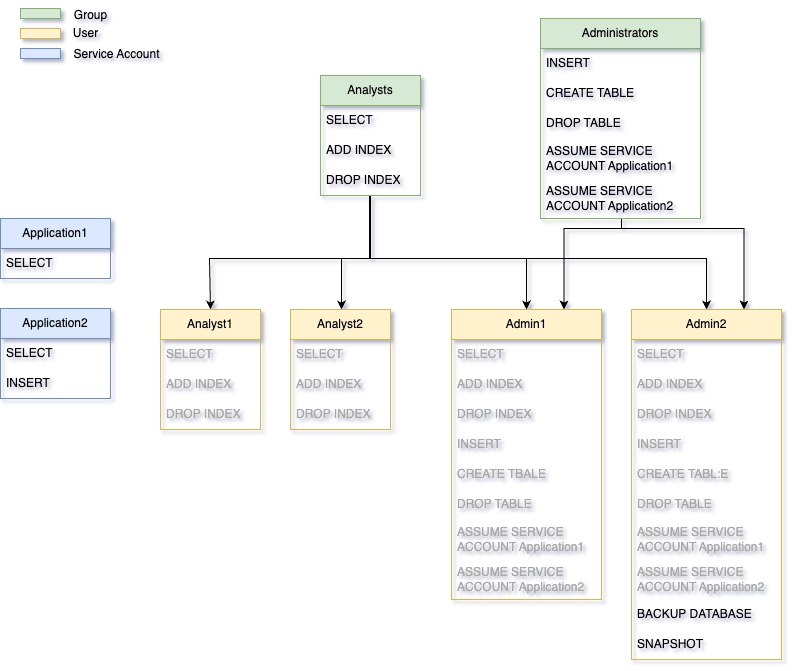
QuestDB has two types of principals:
- Users: For human individuals. Can belong to multiple groups and inherit permissions from them. Cannot be assumed by others.
- Service accounts: For applications. Cannot belong to groups - all permissions must be granted directly. Can be assumed by authorized users for testing.
CREATE USER human_user WITH PASSWORD 'pwd';
CREATE SERVICE ACCOUNT app_account WITH PASSWORD 'pwd';
Names must be unique across all users, service accounts, and groups.
Why service accounts?
Service accounts provide clean, testable application access:
| Aspect | User | Service Account |
|---|---|---|
| Permission source | Direct + inherited from groups | Direct only |
| Can belong to groups | Yes | No |
| Can be assumed (SU) | No | Yes |
| Typical use | Human individuals | Applications, services |
Because service accounts have no inherited permissions, their access is fully explicit and predictable. Combined with the ability to assume them, this makes it easy to verify exactly what an application can and cannot do:
-- Create service account with specific permissions
CREATE SERVICE ACCOUNT trading_app WITH PASSWORD 'pwd';
GRANT ILP TO trading_app;
GRANT INSERT ON trades TO trading_app;
GRANT SELECT ON positions TO trading_app;

-- Developer can assume the service account to test its access
GRANT ASSUME SERVICE ACCOUNT trading_app TO developer;

-- Developer switches to service account context
ASSUME SERVICE ACCOUNT trading_app;
-- Now operating with trading_app's exact permissions
-- Test what works and what doesn't...
EXIT SERVICE ACCOUNT;
This makes service accounts ideal for applications where you need predictable, auditable, and testable access control.
Groups
Groups simplify permission management when multiple users need the same access:
CREATE GROUP analysts;
GRANT SELECT ON ALL TABLES TO analysts;

-- All users added to this group can read all tables
ADD USER alice TO analysts;
ADD USER bob TO analysts;
Users inherit permissions from their groups. Inherited permissions cannot be revoked directly from the user - revoke from the group instead. When a group is dropped, all members lose the permissions they inherited from that group.
Authentication methods
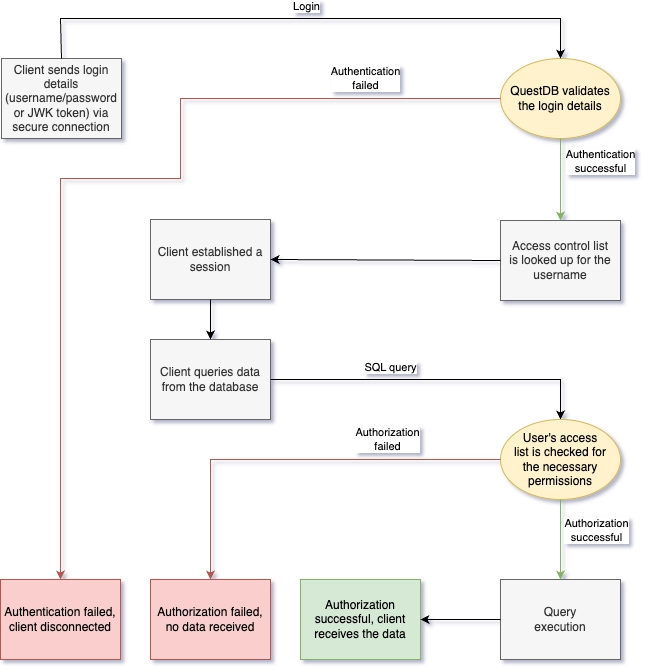
QuestDB supports three authentication methods:
| Method | Use case | Endpoints |
|---|---|---|
| Password | Interactive users | REST API, PostgreSQL Wire |
| JWK Token | ILP ingestion | InfluxDB Line Protocol |
| REST API Token | Programmatic REST access | REST API |
Users can have multiple authentication methods enabled simultaneously:
-- Add JWK token for ILP access
ALTER USER sensor_writer CREATE TOKEN TYPE JWK;

-- Add REST API token (with 30-day expiry)
ALTER USER api_user CREATE TOKEN TYPE REST WITH TTL '30d';
QuestDB does not store private keys or tokens after creation. Save them immediately - they cannot be recovered.
Authentication should happen via a secure TLS connection to protect credentials in transit.
Endpoint permissions
Before a user can connect, they need endpoint permissions:
| Permission | Allows access to |
|---|---|
HTTP | REST API, Web Console, ILP over HTTP |
PGWIRE | PostgreSQL Wire Protocol (port 8812) |
ILP | InfluxDB Line Protocol TCP (port 9009) |
-- Typical setup for an interactive user
GRANT HTTP, PGWIRE TO analyst;

-- Typical setup for an ingestion service
GRANT ILP TO ingest_service;
Built-in admin
Every QuestDB instance starts with a built-in admin account:
- Default username:
admin - Default password:
quest
Change these immediately in production via server.conf:
acl.admin.user=your_admin_name
acl.admin.password=your_secure_password
The built-in admin has irrevocable root access. After creating other admin users, disable it:
acl.admin.user.enabled=false
Permission levels
Permissions have different granularities determining where they can be applied:
| Granularity | Can be granted at |
|---|---|
| Database | Database only |
| Table | Database or specific tables |
| Column | Database, tables, or specific columns |
Examples:
-- Database-level: applies to all tables
GRANT SELECT ON ALL TABLES TO user;

-- Table-level: applies to specific tables
GRANT SELECT ON trades, prices TO user;

-- Column-level: applies to specific columns
GRANT SELECT ON trades(ts, symbol, price) TO user;
The GRANT option
When granting permissions, you can allow the recipient to grant that permission to others:
GRANT SELECT ON trades TO team_lead WITH GRANT OPTION;

-- team_lead can now grant SELECT on trades to others
Owner permissions
When a user creates a table, they automatically receive all permissions on it with the GRANT option. This ownership does not persist - if revoked, they cannot get it back without someone re-granting it.
Advanced topics
Permission re-adjustment
Database-level permissions include access to future tables. If you revoke access to one table, QuestDB automatically converts the database-level grant to individual table-level grants:
GRANT SELECT ON ALL TABLES TO user;  -- Database level
REVOKE SELECT ON secret_table FROM user;

-- Result: user now has table-level SELECT on all tables EXCEPT secret_table
-- Future tables will NOT be accessible
The same applies from table to column level:
GRANT SELECT ON trades TO user;           -- Table level
REVOKE SELECT ON trades(ssn) FROM user;   -- Revoke one column

-- Result: user has column-level SELECT on all columns EXCEPT ssn
-- Future columns will NOT be accessible
When dropping a table, permissions on it are preserved by default (useful if
the table is recreated). Use DROP TABLE ... CASCADE PERMISSIONS to also
remove all associated permissions.
Implicit timestamp permissions
If a user has SELECT or UPDATE on any column of a table, they automatically get the same permission on the designated timestamp column. This ensures time-series operations (SAMPLE BY, LATEST ON, etc.) work correctly.
Granting on non-existent objects
You can grant permissions on tables/columns that don't exist yet:
GRANT INSERT ON future_table TO app;
-- Permission activates when future_table is created
Use WITH VERIFICATION to catch typos:
GRANT SELECT ON trdaes TO user WITH VERIFICATION;
-- Fails immediately because 'trdaes' doesn't exist
Service account assumption
Users can temporarily assume a service account's permissions for debugging:
-- Grant ability to assume
GRANT ASSUME SERVICE ACCOUNT ingest_app TO developer;

-- Developer can now switch context
ASSUME SERVICE ACCOUNT ingest_app;
-- ... debug with app's permissions ...
EXIT SERVICE ACCOUNT;
User management reference
Creating and removing principals
-- Users
CREATE USER username WITH PASSWORD 'pwd';
DROP USER username;

-- Service accounts
CREATE SERVICE ACCOUNT appname WITH PASSWORD 'pwd';
DROP SERVICE ACCOUNT appname;

-- Groups
CREATE GROUP groupname;
DROP GROUP groupname;
Managing group membership
ADD USER username TO group1, group2;
REMOVE USER username FROM group1;
Managing authentication
-- Change password
ALTER USER username WITH PASSWORD 'new_pwd';

-- Remove password (disables password auth)
ALTER USER username WITH NO PASSWORD;

-- Create tokens
ALTER USER username CREATE TOKEN TYPE JWK;
ALTER USER username CREATE TOKEN TYPE REST WITH TTL '30d';
ALTER USER username CREATE TOKEN TYPE REST WITH TTL '1d' REFRESH;  -- Auto-refresh

-- Remove tokens
ALTER USER username DROP TOKEN TYPE JWK;
ALTER USER username DROP TOKEN TYPE REST;  -- Drops all REST tokens
ALTER USER username DROP TOKEN TYPE REST 'token_value_here';  -- Drop specific token
Removing all authentication methods (password and tokens) effectively disables the user - they can no longer connect to the database.
Viewing information
SHOW USERS;                    -- List all users
SHOW SERVICE ACCOUNTS;         -- List all service accounts
SHOW GROUPS;                   -- List all groups
SHOW GROUPS username;          -- List groups for a user
SHOW USER username;            -- Show auth methods for user
SHOW PERMISSIONS username;     -- Show permissions for user
Example output from SHOW USER:
auth_type    enabled
---------    -------
Password     true
JWK Token    false
REST Token   true
Viewing other users' information requires LIST USERS (to list all) or
USER DETAILS (to see details) permissions. Users can always view their own
information without these permissions.
Permissions reference
Use all_permissions() to see all available permissions:
SELECT * FROM all_permissions();
Full permissions table (click to expand)
Database permissions
| Permission | Level | Description |
|---|---|---|
| ADD COLUMN | Database | Table | Add columns to tables |
| ADD INDEX | Database | Table | Column | Add index on symbol columns |
| ALTER COLUMN CACHE | Database | Table | Column | Enable/disable symbol caching |
| ALTER COLUMN TYPE | Database | Table | Column | Change column types |
| ATTACH PARTITION | Database | Table | Attach partitions |
| BACKUP DATABASE | Database | Create database backups |
| BACKUP TABLE | Database | Table | Create table backups |
| CANCEL ANY COPY | Database | Cancel COPY operations |
| CREATE TABLE | Database | Create tables |
| CREATE MATERIALIZED VIEW | Database | Create materialized views |
| DEDUP ENABLE | Database | Table | Enable deduplication |
| DEDUP DISABLE | Database | Table | Disable deduplication |
| DETACH PARTITION | Database | Table | Detach partitions |
| DROP COLUMN | Database | Table | Column | Drop columns |
| DROP INDEX | Database | Table | Column | Drop indexes |
| DROP PARTITION | Database | Table | Drop partitions |
| DROP TABLE | Database | Table | Drop tables |
| DROP MATERIALIZED VIEW | Database | Table | Drop materialized views |
| INSERT | Database | Table | Insert data |
| REFRESH MATERIALIZED VIEW | Database | Table | Refresh materialized views |
| REINDEX | Database | Table | Column | Reindex columns |
| RENAME COLUMN | Database | Table | Column | Rename columns |
| RENAME TABLE | Database | Table | Rename tables |
| RESUME WAL | Database | Table | Resume WAL processing |
| SELECT | Database | Table | Column | Read data |
| SET TABLE PARAM | Database | Table | Set table parameters |
| SET TABLE TYPE | Database | Table | Change table type |
| SETTINGS | Database | Change instance settings in Web Console |
| SNAPSHOT | Database | Create snapshots |
| SQL ENGINE ADMIN | Database | List/cancel running queries |
| SYSTEM ADMIN | Database | System functions (reload_tls, etc.) |
| TRUNCATE TABLE | Database | Table | Truncate tables |
| UPDATE | Database | Table | Column | Update data |
| VACUUM TABLE | Database | Table | Reclaim storage |
User management permissions
| Permission | Description |
|---|---|
| ADD EXTERNAL ALIAS | Create external group mappings |
| ADD PASSWORD | Set user passwords |
| ADD USER | Add users to groups |
| CREATE GROUP | Create groups |
| CREATE JWK | Create JWK tokens |
| CREATE REST TOKEN | Create REST API tokens |
| CREATE SERVICE ACCOUNT | Create service accounts |
| CREATE USER | Create users |
| DISABLE USER | Disable users |
| DROP GROUP | Drop groups |
| DROP JWK | Drop JWK tokens |
| DROP REST TOKEN | Drop REST API tokens |
| DROP SERVICE ACCOUNT | Drop service accounts |
| DROP USER | Drop users |
| ENABLE USER | Enable users |
| LIST USERS | List users/groups/service accounts |
| REMOVE EXTERNAL ALIAS | Remove external group mappings |
| REMOVE PASSWORD | Remove passwords |
| REMOVE USER | Remove users from groups |
| USER DETAILS | View user/group/service account details |
Special permissions
| Permission | Description |
|---|---|
| ALL | All permissions at the granted level (database/table/column) |
| DATABASE ADMIN | All permissions including future ones; can assume any service account |
SQL commands reference
- ADD USER
- ALTER USER
- ALTER SERVICE ACCOUNT
- ASSUME SERVICE ACCOUNT
- CREATE GROUP
- CREATE SERVICE ACCOUNT
- CREATE USER
- DROP GROUP
- DROP SERVICE ACCOUNT
- DROP USER
- EXIT SERVICE ACCOUNT
- GRANT
- GRANT ASSUME SERVICE ACCOUNT
- REMOVE USER
- REVOKE
- REVOKE ASSUME SERVICE ACCOUNT
- SHOW USER
- SHOW USERS
- SHOW GROUPS
- SHOW SERVICE ACCOUNT
- SHOW SERVICE ACCOUNTS
- SHOW PERMISSIONS