Replication tuning
Replication tuning lets you balance latency against network costs. By default, QuestDB uses balanced settings. You can tune for lower latency or reduced network traffic depending on your needs.
When to tune
| Goal | Approach |
|---|---|
| Low latency | Smaller WAL segments, shorter throttle windows. |
| Lower network costs | Larger WAL segments, longer throttle windows. |
Quick reference
For low latency:
cairo.wal.segment.rollover.size=262144
replication.primary.throttle.window.duration=1000
replication.primary.sequencer.part.txn.count=5000
For network efficiency:
cairo.wal.segment.rollover.size=2097152
replication.primary.throttle.window.duration=60000
replication.primary.sequencer.part.txn.count=1000
How replication works
Understanding the data flow helps you tune effectively:
- Ingestion - Data is written to Write-Ahead Log (WAL) segments
- Upload - WAL segments are uploaded to object storage
- Download - Replicas download and apply WAL segments
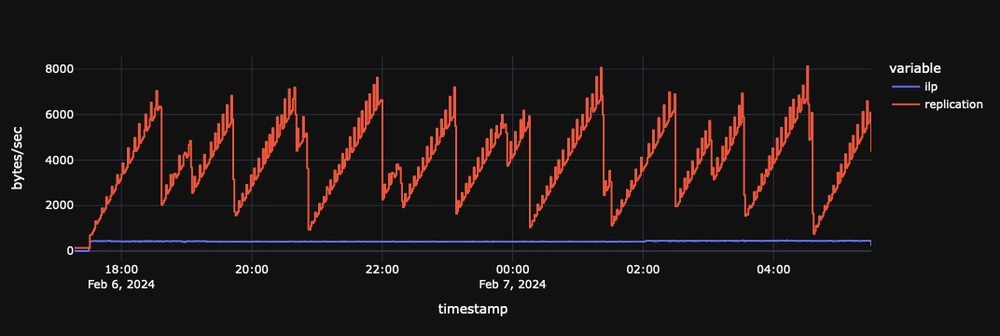
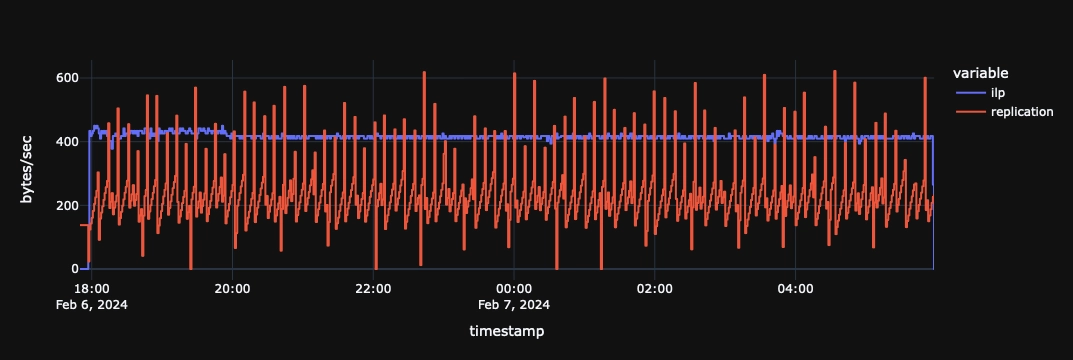
The key insight: smaller, more frequent uploads = lower latency but more network traffic. Larger, less frequent uploads = higher latency but lower costs.
Settings explained
WAL segment size
cairo.wal.segment.rollover.size=2097152
Controls when WAL segments are closed and uploaded. Smaller segments upload sooner (lower latency) but create more files.
| Value | Behavior |
|---|---|
262144 (256 KiB) | Lower latency, but more network traffic. |
2097152 (2 MiB) | Higher latency, but less network traffic. |
Some object stores have minimum file size requirements. AWS S3 Intelligent Tiering requires files over 128 KiB.
Throttle window
replication.primary.throttle.window.duration=10000 # 10 seconds (default)
Maximum time before uploading incomplete segments. Longer windows let segments fill up before upload, reducing redundant uploads (write amplification).
| Value | Behavior |
|---|---|
1000 (1s) | Lowest latency, most uploads. |
10000 (10s) | Default. Balanced. |
60000 (60s) | 1 minute delay OK. Fewer uploads. |
300000 (5 min) | Cost-sensitive. Batches more data. |
This is your maximum replication latency tolerance. QuestDB still actively manages replication to prevent backlogs during bursts.
Sequencer part size
replication.primary.sequencer.part.txn.count=5000
Controls how many transactions are grouped into each sequencer part file.
Instead of uploading the entire transaction log on every replication cycle (which grows indefinitely), the sequencer is split into fixed-size part files. Only new or changed parts are uploaded, significantly reducing network overhead.
| Value | Effect |
|---|---|
Lower (e.g. 1000) | Smaller part files, more frequent new parts, more object storage requests, faster incremental uploads. |
Higher (e.g. 5000) | Larger part files, fewer parts, fewer object storage requests, larger per-upload size. |
Default is 5000 (each part ~34-68 KiB compressed).
This setting is fixed at table creation. You cannot change it for existing tables.
Compression (reference)
WAL data is compressed before upload. This isn't tunable, but useful for estimating storage and network requirements:
| Data type | Compression ratio |
|---|---|
| WAL segments | ~8x |
| Sequencer parts | ~6x |
For example, a 2 MiB WAL segment becomes ~256 KiB in object storage.
Next steps
- Replication overview - How replication works
- Setup guide - Configure replication
- Configuration reference - All server settings